Home

Wos Helper

wos-helper.com
Home
Community LeaderboardPuzzle GameLockedSupportersASCII ArtGift CodesLocked
GeneralBear TrapHelperLockedFoundryFrost FireCrazy JoeArenaHero Gallery
Dreamscape MemoryFishingSoonSnow BustersSoon
Building CalculatorResearch CalculatorWar Academy CalculatorTroop Training CalculatorChief Gear CalculatorCharm CalculatorHero Gear CalculatorExpert CalculatorPet CalculatorServer Timeline
Home
Community LeaderboardPuzzle GameLockedSupportersASCII ArtGift CodesLocked
GeneralBear TrapHelperLockedFoundryFrost FireCrazy JoeArenaHero Gallery
Dreamscape MemoryFishingSoonSnow BustersSoon
Building CalculatorResearch CalculatorWar Academy CalculatorTroop Training CalculatorChief Gear CalculatorCharm CalculatorHero Gear CalculatorExpert CalculatorPet CalculatorServer Timeline

Failed to load puzzle data

Cross-Alliance Puzzle Trading

Quick Guide

1

Find Trades

Use the Marketplace to find pieces you need or can give away.

2

Contact & Trade

Copy their name, add in-game, join same alliance temporarily to trade.

3

Update Data

After trading, update your puzzle pieces here to keep data accurate.

Keep data updated! The Marketplace shows what players reported. Outdated data may show pieces that were already traded.

Puzzle Marketplace

Find trading partners on your server

Track Your Pieces

Mark owned pieces in the puzzle editor so the marketplace can match you with trading partners.

Sync After Trading

After a trade, use the sync button in Last Trades to automatically update your collection.

Exclude Chapters

Use the eye icon on chapters to hide completed ones from marketplace results.

Puzzle Marketplace

Puzzle Collection

Select a Chapter

Click the eye icon on a chapter to exclude it from the Marketplace. Excluded chapters won't appear in "You Need" or "Others Need" results, but will still show up in Search.

Chapter Puzzles

Chapter 1

Select a puzzle to view and manage pieces

Search in Market

Puzzle Pieces

Puzzle Name

0 / 12 pieces collected

Edit Mode

Edit mode:

Interval
Seconds between auto-advance
sec
Paused
Numbers advance
0-9 sets value & advances, Enter skips

Options

Auto-advance
Move to next puzzle automatically
All Modes
1-9 Set count
0 Toggle owned
A Toggle all
Ctrl+Z Undo
Ctrl+Y Redo
Hover Mode
LMB Add piece
RMB Remove piece
Sequential Mode
Enter Next piece
⌫ Previous piece
Timed Mode
Space Pause/Resume

Click on puzzle pieces to add or remove them.

•
Use ← → arrow keys

Legend

Not Owned
Owned
Has Extras
Non-Tradable
🔒Puzzle Game

Login to track your puzzle pieces and trade with other players.

Login to continue

Puzzle Pieces

Not Owned
Owned
Has Extras
Non-Tradable
View in Editor

Account Password

Secure your account

Create a password to protect your account from unauthorized access.

Enter your password to continue.

Forgot your password or someone else set one on your account?

Request Password Reset

Select Language

Translate to

Powered by DeepL

More languages coming soon

Language missing? Report a wrong translation?

Cookie Settings

We use cookies to enhance your experience. You can choose which cookies you want to allow. Privacy Policy

Cookie Settings

Essential

Always on

Required for the website to function properly.

Analytics

Help us understand how visitors use our site via Google Analytics.

Preferences

Remember your settings and preferences.

Support

What can we help you with?

We'll use this to respond to your ticket

Optional - helps us identify your account

Ticket submitted! We'll get back to you soon.

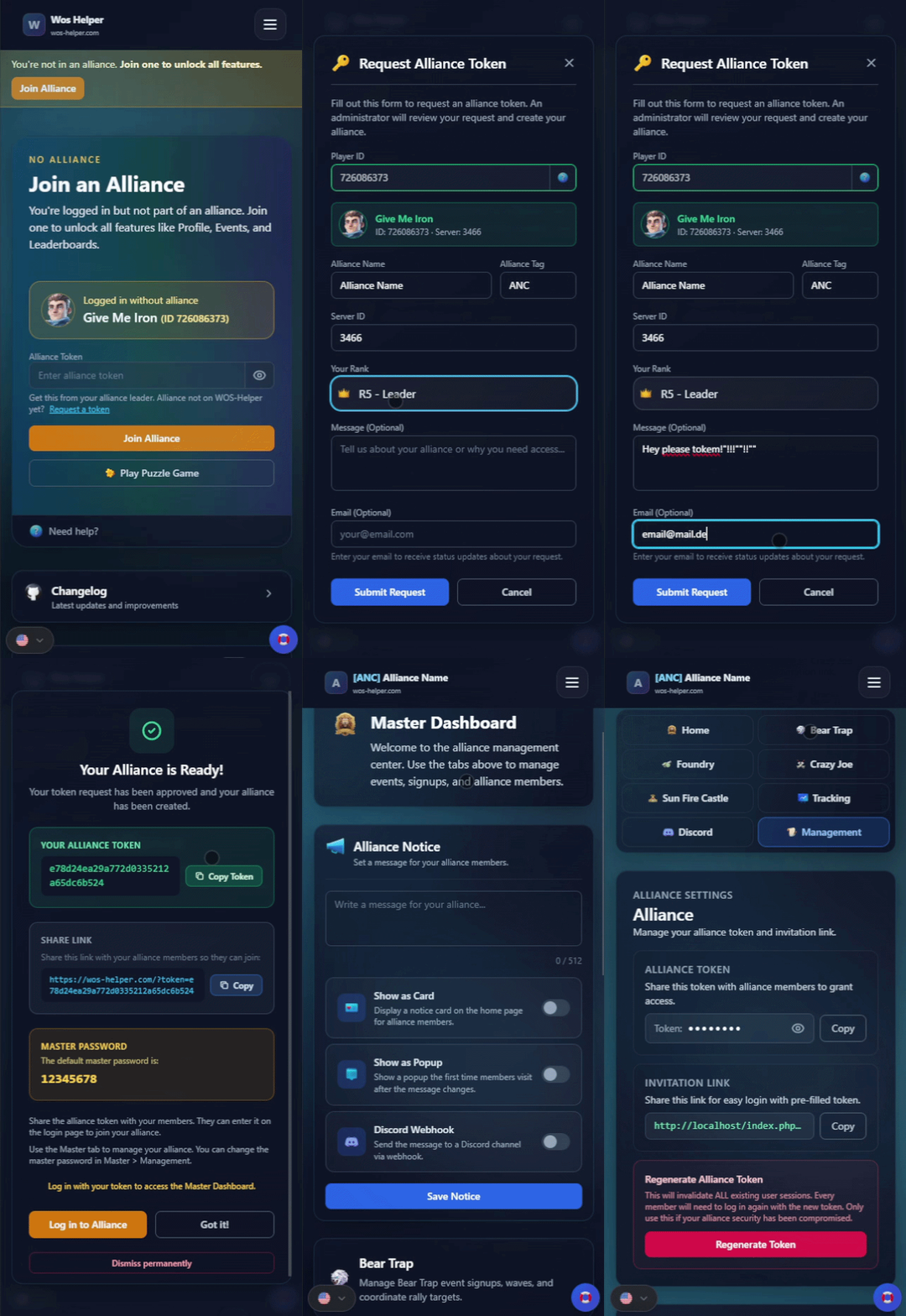
Request Alliance Token

Fill out this form to request an alliance token. An administrator will review your request and create your alliance.

ID: · Server:

Enter your email to receive status updates about your request.

Your Alliance is Ready!

Your token request has been approved and your alliance has been created.

Your Alliance Token

Share Link

Share this link with your alliance members so they can join:

Master Access

Master access is open by default. You can set an optional password in Master > Management.

Share the alliance token with your members. They can enter it on the login page to join your alliance.

Use the Master tab to manage your alliance. You can set a master password in Master > Management for extra security.

Log in with your token to access the Master Dashboard.

Your alliance is ready!

Your token request was approved. Log in with your token to get started.

How to request an alliance token

Watch the short tutorial to see how to request and set up your alliance token.

Join our Discord
Legal Notice • Privacy Policy •
Icons by Icons8 • v1.9.3